 PANDASHOKAI
Detect and stop suspicious encryption
Detect suspicious encryption activity in monitored folders and forcibly terminate the responsible process. rakko helps limit the spread of damage and alerts you with a desktop notification.
How detection works +Places decoy files in monitored folders and watches for suspicious access. By forcibly terminating a detected process, rakko aims to limit the spread of ransomware damage.
Windows / Free plan available Watch.
Place decoy files in selected folders to detect operations such as writes and deletions. Identify and terminate the process responsible to limit the impact on other data.
Detect suspicious encryption activity in monitored folders and forcibly terminate the responsible process. rakko helps limit the spread of damage and alerts you with a desktop notification.
How detection works +Check monitoring status, detections, and logs. Use the management console to add monitored folders, register trusted processes, and activate your license.
Using the management console +Choose from three perpetual license plans, including a free plan and options for up to 1,000 installations. If you need more installations, you can upgrade by paying the price difference.
License plans +Ransomware encrypts important files, such as photos and documents, making them unusable. rakko detects encryption activity to help limit the spread of damage; it does not prevent the initial infection.
rakko places decoy files in monitored folders. When ransomware attempts to encrypt these files, rakko detects the activity and monitors the responsible process.
rakko monitors access to decoy files in selected folders in the background.
When abnormal encryption activity is detected, rakko monitors the behavior of the process that accessed the file.
When the monitored process attempts further encryption, rakko automatically terminates it to help limit the spread of damage.
After stopping the process, rakko alerts you with a desktop notification. You can review detections and logs in the management console.
By focusing on encryption activity without relying on threat definition files, rakko may also help reduce damage from previously unknown ransomware. There are no threat definition files to update for rakko.
Use rakko as a second line of defense that complements your existing antivirus software, rather than replacing it.

Click this icon in the system tray to open the management console.
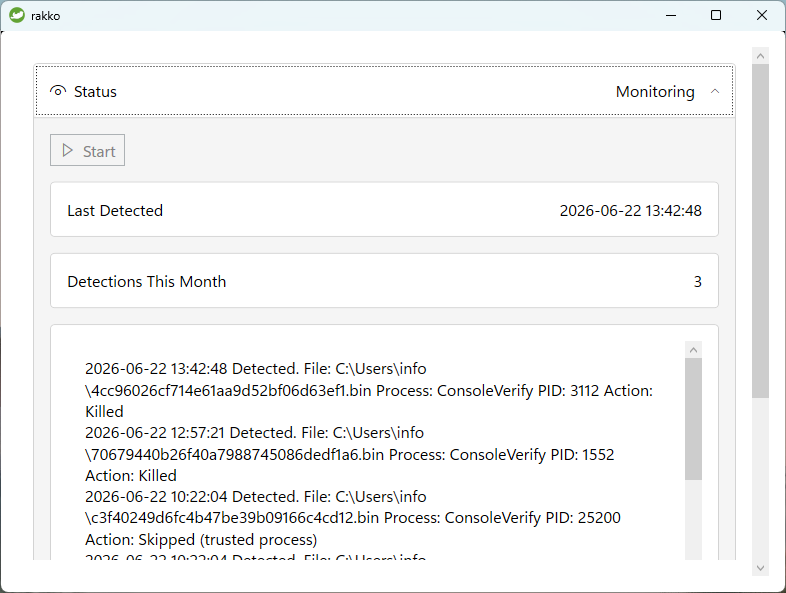
Check the current monitoring status, the date and time of the last detection, this month's detection count, and logs. If monitoring has stopped, click "Start" to resume it.
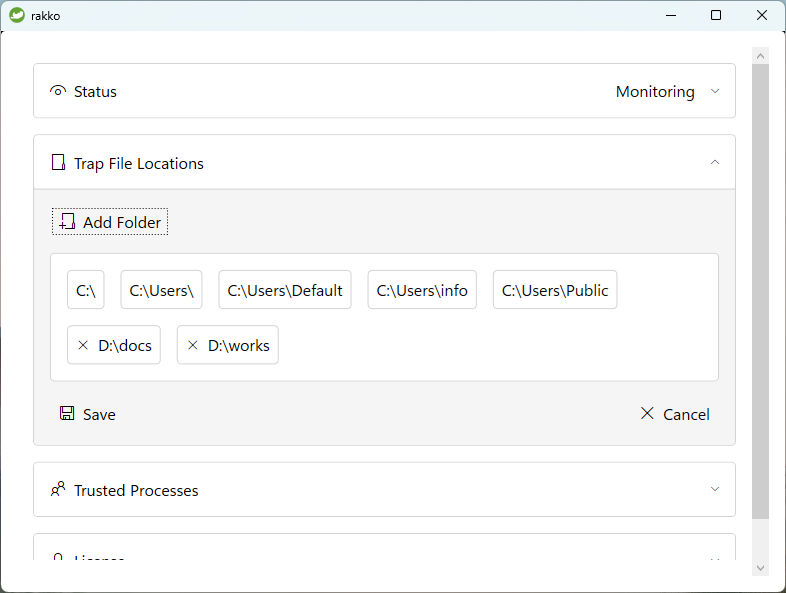
Add folders alongside the default monitored locations. Click "Add Folder" and select the folder you want to monitor. You can remove added folders later.
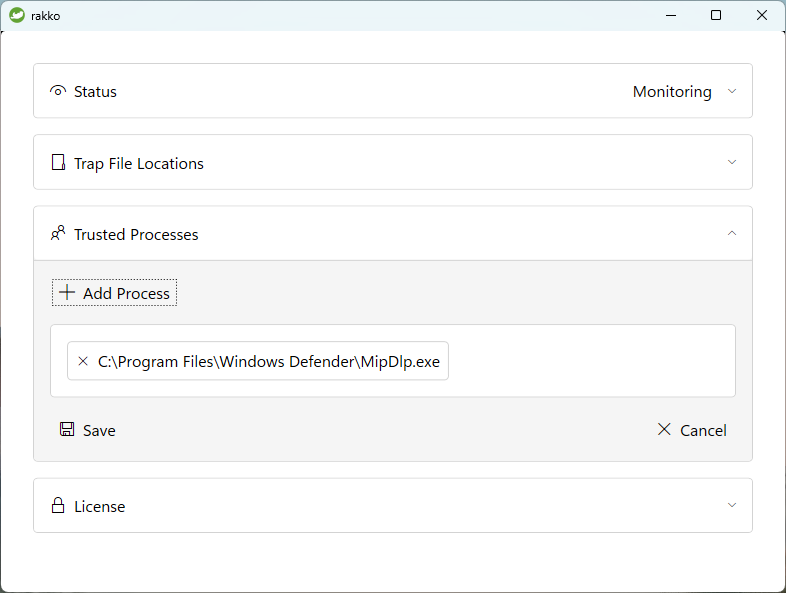
Legitimate apps, such as backup software and business applications, may access decoy files. Click "Add Process" to register an app as a trusted process and exclude it from detection. You can remove registered apps later.
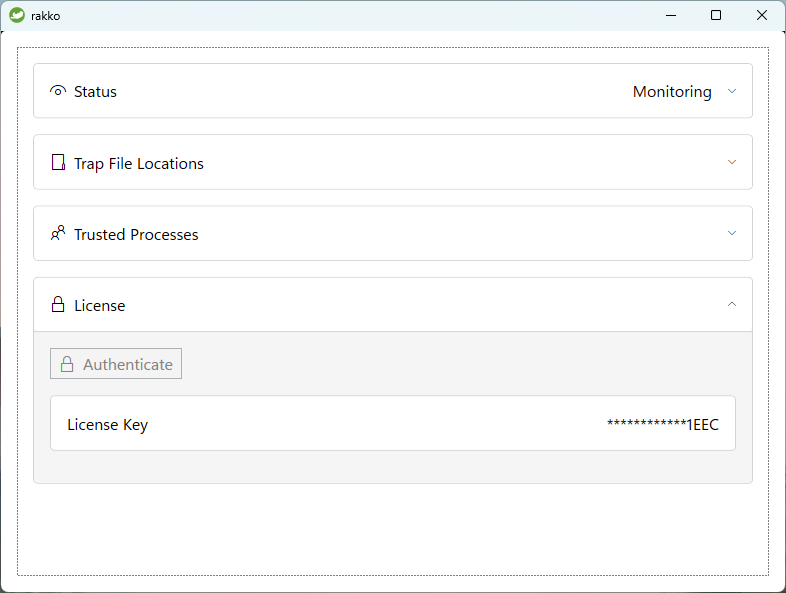
Check your license activation status. Only the last four characters of an activated key are displayed. If your license is not activated, click "Activate" and enter your license key.
Choose from three plans, including a free plan. All plans include a perpetual license.
Up to 3 installations
For personal use and evaluation
Perpetual license
Up to 100 installations
For small and medium-sized businesses and departments
Perpetual license
Up to 1,000 installations
For large organizations
Perpetual license
You can upgrade to a higher plan later by paying the price difference. If you need more than 1,000 installations, please contact us.
A license key is required to use rakko, including the free plan. Enter your email address to receive a verification email containing a link to the license registration page.
Enter your email address below and click "Send verification email."
Open the link in the verification email.
Set a password, enter the license holder's name, and choose a plan. For paid plans, pay by credit card or bank transfer.
After registration, your download link and license key will be sent by email. Keys for the free plan are enabled immediately; keys for paid plans are enabled after payment is confirmed.
Run the installer to install rakko. After installation, enter your license key on the screen that appears to activate your license.
By clicking "Send verification email," you agree to our Terms of Use and Privacy Policy.
Keep your verification email. It contains the link you need to log in to the license management page.
You can change to a higher plan only, by paying the price difference. Your existing license key remains valid.
Open the link in the verification email you received when registering.
Enter the password you set to log in.
Check your current plan and installation count.
Select the higher plan you want and pay the price difference by credit card or bank transfer.
Once payment is confirmed, you will receive an email confirming your plan change.
Keep your original verification email, as it contains the link you need to log in.
rakko complements your existing security measures. Use it alongside antivirus software and backups. It does not guarantee detection or prevention of all ransomware or malware.
Each successful license key activation counts as one installation. Reinstalling rakko on the same PC or installing it on a replacement PC also counts as a new installation. Uninstalling rakko does not reduce the installation count.
It stands for Ransomware Attack Knockout & Keep-safe Observer. The logo features a sea otter, called “rakko” in Japanese.
| Business operator |
PANDA SHOKAI, LIMITED LIABILITY COMPANY
Corporate Number: 4060003004220 |
|---|---|
| Representative | Suguru Suzuki |
| Address | 1-5-28-603 Honcho, Aoba-ku, Sendai, Miyagi, Japan |
| Telephone |
+81-90-2201-8177
We do not accept inquiries by telephone. Please use "Contact" at the bottom of this page. |
| Website | https://pandafirm.jp/en/ |
| Contact | Please use "Contact" at the bottom of this page. |
| Prices | See the "License" section on this page. |
| Additional fees | Bank transfer fees are the customer's responsibility. |
| Payment methods |
Bank transfer or credit card
For bank transfers, please pay within 30 days of the invoice issue date. |
| Delivery and activation | License keys are sent by email immediately after registration. Keys for the free plan are enabled immediately; keys for paid plans are enabled after payment is confirmed. |
| Returns and cancellations |
Due to the nature of software licenses, cancellations and refunds are not accepted after license activation.
Please test rakko with the free plan before purchasing. |